
Dock & yard operations
Scheduling is where ROME starts, not where it ends.
Connect your schedule to the gate, yard, and dock. Keep the work moving and the visit history in one place.
WHEN THE PLAN CHANGES
The schedule is only part of the job.
Trucks arrive early. Door work runs long. Keep the gate, yard, and dock working from the same information as the shift changes.
GATE
Arrivals change the plan.
See who checked in, match the visit to its appointment, and decide where it goes next.
YARD
The next move needs a shared view.
Bring arrivals, door status, and priorities together before calling the next truck.
ACCOUNTS PAYABLE
Waiting time needs a record.
Review check-in, work, and departure times against the carrier’s agreed terms.
HOW ROME WORKS
One truck, from appointment to departure.
Follow trailer 2210 through a sample live visit.
TRAILER 2210NOT ON SITE
TIME ON SITE
--:--
0:002:00 FREE TIME
The appointment is scheduled. Time on site begins with the recorded check-in, not the booking.
THE PRODUCT
Screens you can read from across the dock.
The door board
Trailer, carrier, load, and next action—at each door. Add temperature readings when the work requires them.
How scheduling feeds the board →The truck queue
Review checked-in visits, due times, and positions before assigning a door.
More on yard and queue →The yard map
See recorded trailer positions, load state, and available spaces in the yard schematic.
See the yard tools →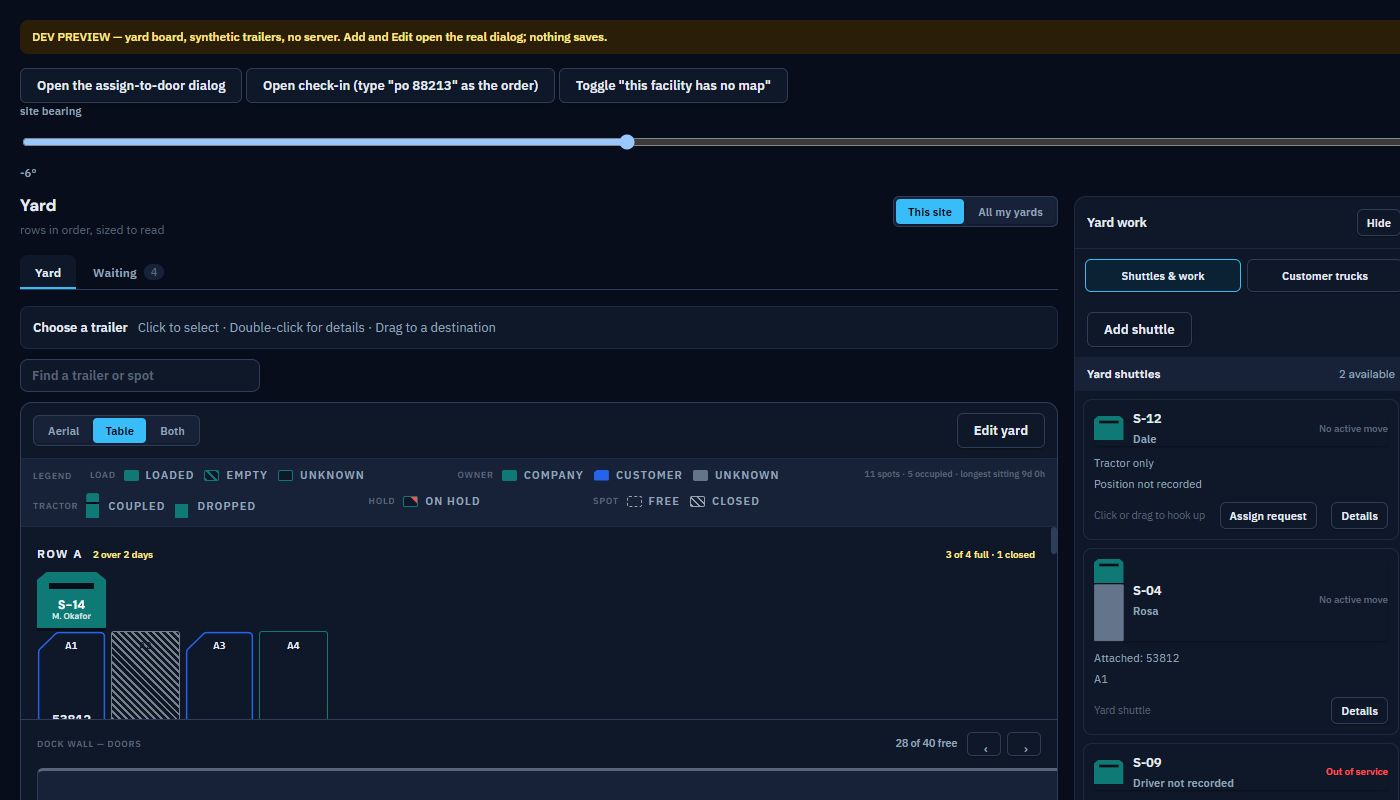
ANALYZE
Turn recorded events into a clearer view.
Review the shift, compare facilities, and track goals using the events your team records.
See the dashboards →Carrier self-booking. Approved contacts find prepared work and choose an available slot.
Drivers check in from the cab. Drivers submit check-in details through the gate QR form.
Up on the wall. The same board in the shipping office and at the doors.
WHAT ROME IS ABOUT
Run the dock today. Improve it with the data tomorrow.
How long did trucks wait? Where did work slow down? Which delays keep returning? ROME brings recorded events and delay reasons together so your team can review the shift and compare performance over time.
01 · RUN
One board for the whole visit
Booking, check-in, the queue, doors and departure, on screens the floor can read from a step back.
02 · RECORD
A timeline of recorded events
Supported workflow actions create timestamps as your team records the work. Accurate reporting still depends on timely, complete entries.
03 · EXPLAIN
Context for delays
Record reasons when work runs late, then review recurring causes alongside the timeline.
04 · IMPROVE
Targets you can measure
Set targets per plant and compare recorded performance with them to decide where to focus next.